Designing group decisions with AI: Trewise conflict resolution
Trewise is a group trip planning app I’m building with a friend.
Role
PD
Product designer, solo
Focus
1
Conflict flow
Variations
3
UI directions
Tools
3
Claude, Stitch, Figma
Starting with the problem
Before using AI, I defined the problem myself.
Planning a trip with friends often means combining different preferences into one shared itinerary. When several people suggest different places for the same day, reaching an agreement can quickly turn into a long conversation, usually in a group chat.
How might we help a group reach a shared decision without making the planning process feel like a negotiation?
I focused on one specific moment: when two or more suggestions conflict. This became the foundation for the AI-assisted exploration that followed.
Testing my intuition with scenarios
I asked Claude to write four ways a group could react when two suggestions conflict, as inner monologues from each person’s point of view.
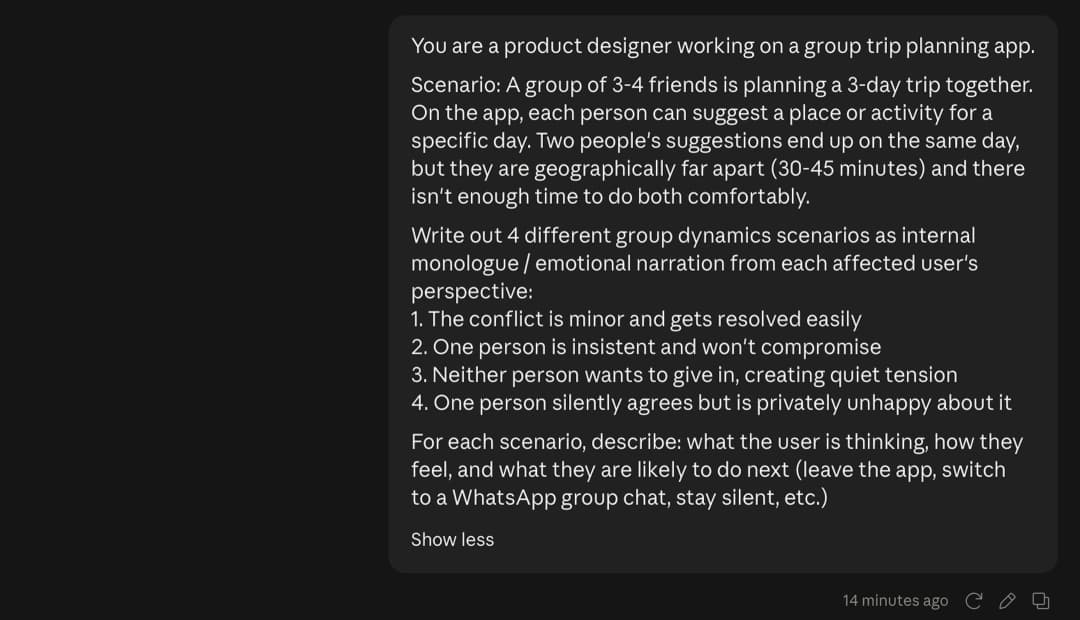
Claude · The prompt
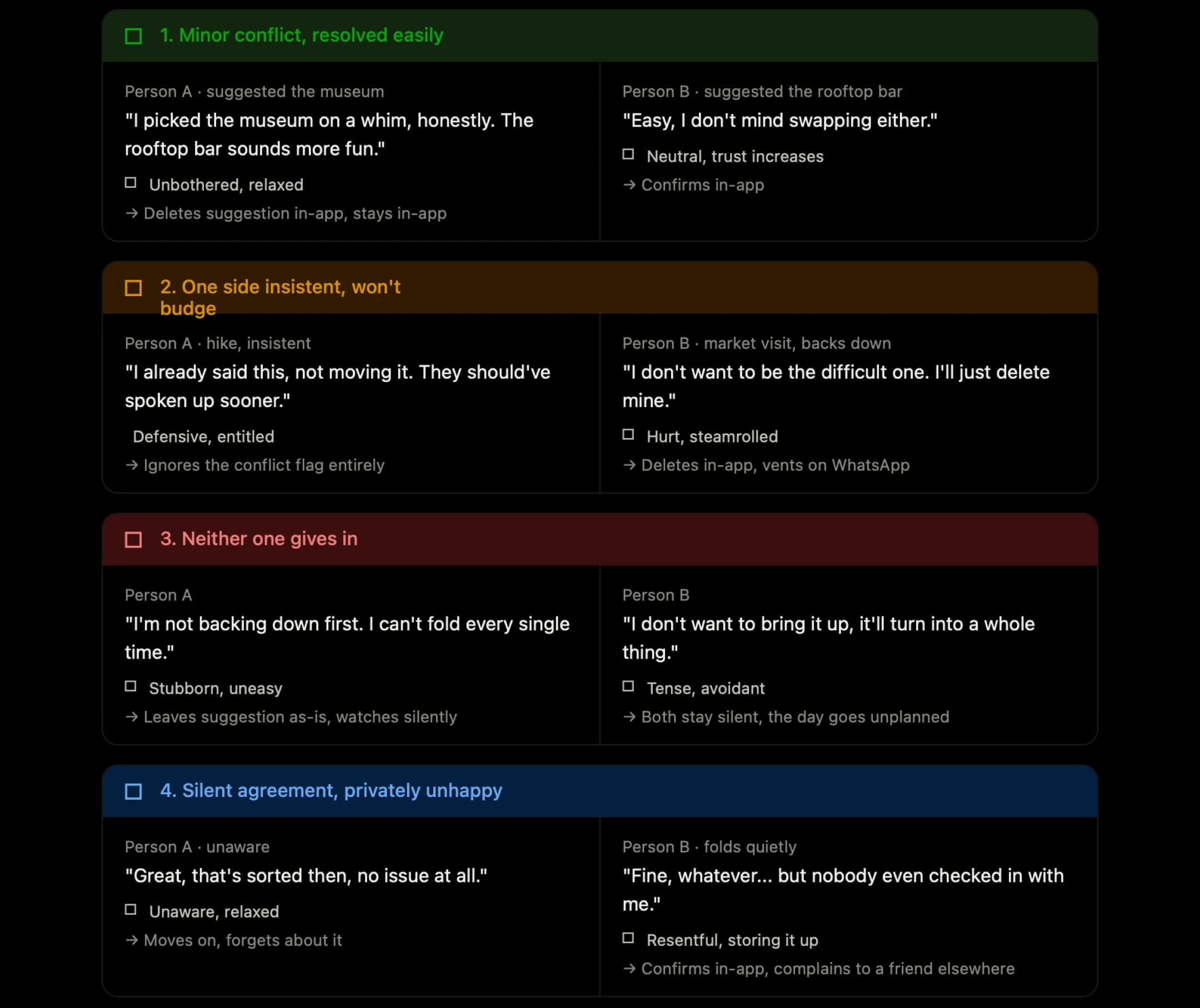
Claude · Four ways a group could react. Scenario 4 shaped the design.
One scenario stood out
The fourth scenario Claude wrote was the member who quietly agrees with the group but stays unhappy. It showed me that a simple majority vote wouldn’t solve the problem.
That changed my goal. It wasn’t only about helping the group choose an option. It was about making sure everyone still felt considered after the decision. This became the minority experience state in the flow.
Pressure-testing the flow
Before moving into the interface, I used Claude to pressure-test the decision-making logic. I explored what should happen when suggestions conflict, how resolution options should be generated, and how the group should reach a final decision. The goal was to identify gaps in the logic before turning it into UI.
I mapped how the system should detect a conflict and what happens next, then checked the logic myself.
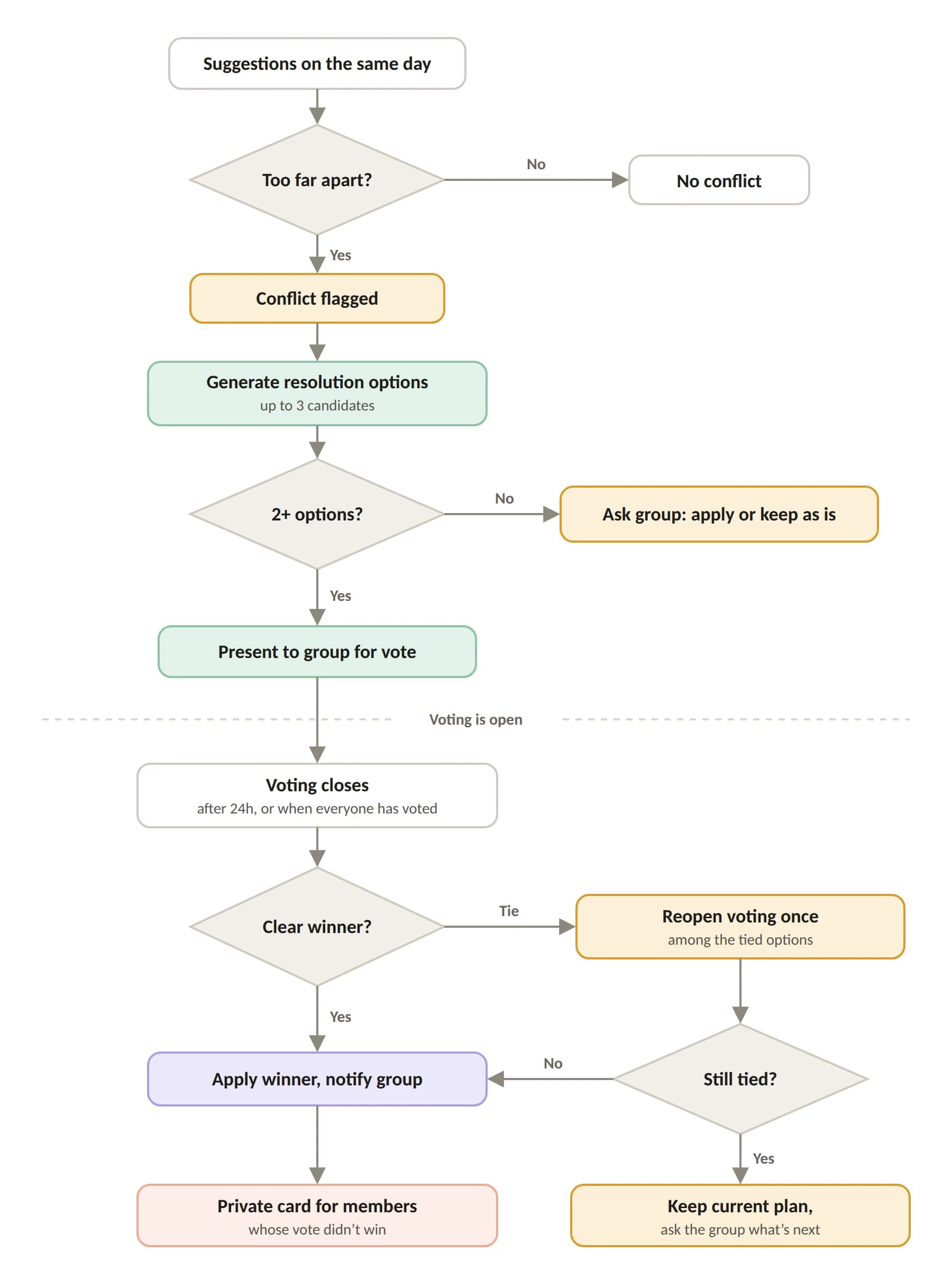
Decision logic · From conflict detection to outcome.
The flow answers three questions:
- When is a conflict real? Only when two suggestions on the same day are too far apart to fit comfortably.
- What does the AI do? It generates up to three resolution options. It never picks one.
- Who decides? Always the group.
Claude flagged gaps in my first version of the logic. These needed a decision before any UI:
| Gap | My decision | Why |
|---|---|---|
| A tie in voting | Reopen once among the tied options; if still tied, keep the current plan | The group keeps the decision |
| Members who don’t vote | Voting closes after 24h, with one gentle reminder | Avoids the silent stalemate |
| The losing side | A private “Save for another day” card | Addresses the fourth scenario |
| Only one option generated | Ask the group, never apply automatically | The AI suggests, the group decides |
From logic to interface
With the logic in place, I used Google Stitch to explore how the conflict moment could look on a map. I wrote the brief myself (tone, trigger, what the AI may and may not do) and asked for the first variation: a small overlay card on the trip map.
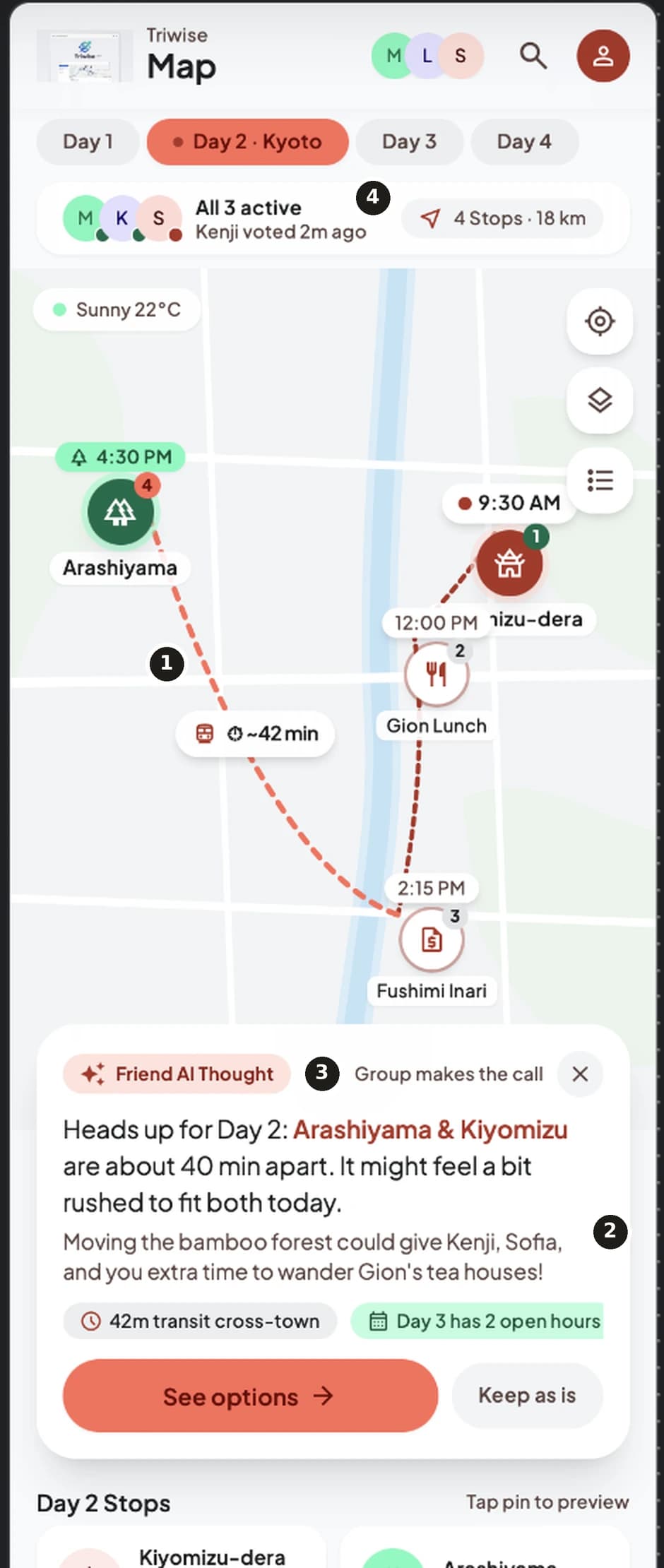
Stitch · First output (Variation A: map overlay)
The first result got the tone right, but it drifted from my brief in four places. I annotated them before writing a revision prompt.
- 1Red is used for the conflict, so it reads as an alarm, not a heads-up
- 2The card already suggests a fix, so the AI decides before the group does
- 3“Group makes the call” is tiny gray text, though it is the core principle
- 4“Kenji voted 2m ago” appears before any vote exists
What worked: the calm wording, the “Keep as is” escape hatch, and the dashed route with “~42 min” that shows the problem at a glance.
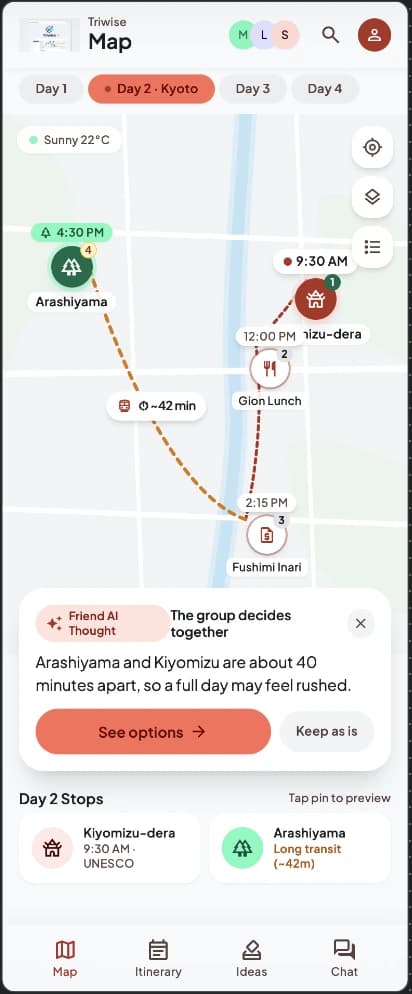
Stitch · After my revision prompt
One revision round fixed most of the drift. The card is now a single sentence, it no longer proposes a fix, the “Kenji voted” strip is gone, and the principle is readable. The conflict color is softer, but not yet neutral.
Two details still needed my hand: the highlighted route does not match the two places named in the card, and the header row is cramped. I fixed both in Figma.
Three variations, one brief
I gave Stitch the same context block (scenario, tone rules, what the AI may and may not do) and asked for three ways to present the same conflict: A (a small overlay card, after one revision round), B (a bottom sheet) and C (a full-screen page).
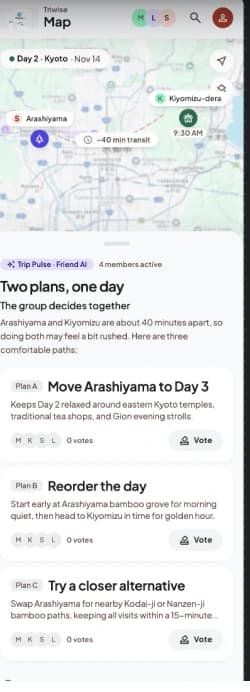
Most of my rules held in B and C: no red, no option pre-selected, voting starts at zero, and “The group decides together” is readable at body size. What Stitch added on its own: product names I never asked for (Trip Pulse, Friendly Sync), used inconsistently.
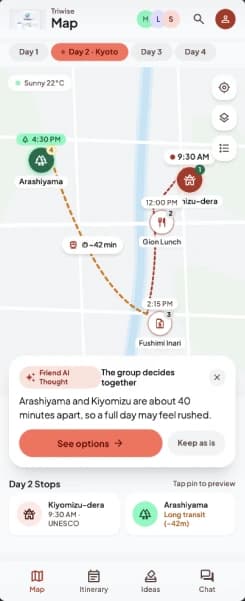
A · Overlay card
Lightest touch, but voting needs an extra tap
B · Bottom sheet
The group votes with the map still in view
C · Full screen
Clearest overview of votes, but the map is gone
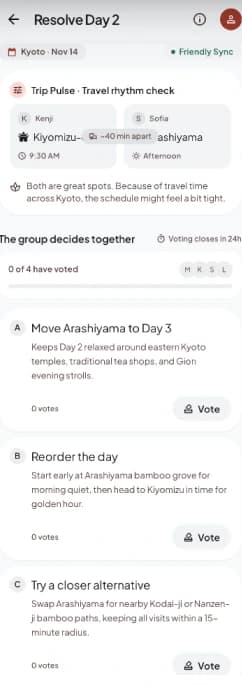
I chose the bottom sheet for voting because the conflict is about distance. Keeping the map in view lets people vote with the geography in front of them. The full-screen version gave a clearer overview of votes, but it removed that context. Variation A stays as the trigger: a light card that opens the voting sheet.
From screens to a working prototype
A static screen can’t tell me whether a voting flow actually works: who sees what, when, and what happens on a tie. So I built a clickable prototype with Claude, using mock data and a stylized map.
Before prompting, I set the product rules myself:
- The AI suggests, the group decides. Nothing is applied automatically.
- Votes stay hidden until voting closes, so early results can’t pressure anyone.
- Ties reopen once, only among the tied options.
- Anyone whose vote didn’t win sees a private “Save for another day” card.
Prototype walkthrough: conflict card, voting, result, and the private card for a member whose pick didn’t win.
Not yet tested with users. The flow is validated against the scenarios and rules above, not against real groups. A usability test with friend groups would be the next step.
How AI fit into the process
| Step | Tool | What it did | What I decided |
|---|---|---|---|
| Problem | None | Nothing | The problem, the moment to focus on, the job to be done |
| Scenarios | Claude | Wrote four group dynamics as inner monologues | Which one mattered: the member who quietly agrees |
| Decision logic | Claude | Turned my rules into a decision tree and flagged gaps | How ties, silence and the losing side are handled |
| UI exploration | Google Stitch | Generated three ways to present the same conflict | The bottom sheet for voting, because the map stays in view |
| Prototype | Claude | Built a clickable prototype from my product rules | The rules themselves, and what each member sees |
Built solo, end to end, with AI supporting every step except the problem definition.
Where AI needed correcting:
- Stitch used red for the conflict, so it read as an alarm, though my brief asked for a calm tone.
- Its first card proposed a fix on its own, so the AI was deciding before the group did.
- It invented product names I never asked for (Trip Pulse, Friendly Sync) and used them inconsistently.
- Its option wording favored one suggestion over the other, so I rewrote the options to be symmetric.
- In my own decision tree, a single-option case was applied automatically. That broke the “the group decides” principle, so I changed it to a vote.
AI made exploring faster, but the useful decisions were human ones: which scenario mattered, who sees what, and how the person whose pick lost still feels considered.